The AI Rocket Ship
intelligence.join(analytics, on=["smarts"], how="full outer")
Data Preparation for AI
Collab
TL;DR
Built an end-to-end enterprise data preparation framework in Palantir Foundry covering structured and unstructured data. Implemented reusable PySpark cleaning utilities, enforced data quality using Expectations, modeled business-aware Ontology objects with security controls (PII encryption + row-level policies), and operationalized semantic search using embeddings. The result: messy enterprise data transformed into governed, AI-ready business assets with full lineage, traceability, and production-grade reliability.
Introduction
Everyone talks about AI models. In real world production systems, most of the effort still goes into data cleaning, especially when data appears structured but fails basic analytical and semantic expectations.
Why Data Cleaning Is Mission-Critical
Poor data quality is the primary reason why 85% of AI projects fail in production. Even sophisticated algorithms cannot overcome fundamental data issues like inconsistent formats, missing values, and logical violations lead to unreliable models, biased predictions, and costly business failures. Organizations typically spend 70-80% of AI project time on data preparation rather than model development.
Enterprise Data Types & Core Challenges
Structured Data (databases, spreadsheets, APIs): Format inconsistencies, missing values, logical violations, duplicate records
Unstructured Data (PDFs, documents, images, emails): Mixed digital/scanned formats, complex layouts, OCR requirements, content extraction complexity
Semi-Structured Data (JSON, XML, logs): Schema variations, nested hierarchies, encoding issues, format evolution over time
The Foundry Advantage
This is where Palantir Foundry stands out. Rather than brittle, one-off scripts, Foundry provides a production-grade data operating system where pipelines, governance, quality, security, and ontology are first-class citizens. Using Pipeline Builder and Code Repositories, teams can transform messy datasets into AI-ready, ontology-aligned data with full lineage and traceability.
Structured Data
Enterprise structured data often looks clean in databases, but hidden quality issues silently break analytics and AI models in production. The real challenge isn’t just fixing individual records, it’s building reusable, governed processes that scale across enterprise datasets and prevent quality issues from derailing AI performance.
We demonstrate a comprehensive cleaning pipeline using three enterprise datasets: Customer, Product Inventory, and Sales Transactions, processed via Code Repositories with shared utilities for consistency and maintainability. This approach transforms problematic raw data into secure, semantic business assets ready for AI consumption. This is where Palantir Foundry moves beyond traditional data platforms — turning cleaned data into governed, reusable assets that AI systems can trust.
Raw Structured Data -> Data Issue Identification -> Standardized Cleaning & Validation -> Ontology Mapping -> Governed AI-Ready Business Data
Step 1: Data Issue Identification
Common Enterprise Data Quality Issues (with Examples & Resolution Strategies) In Palantir Foundry, identifying issues early helps define what cleaning logic, validation checks, and reusable transformations should be built into pipelines. Even structured tables develop recurring quality problems due to manual inputs, system migrations, and multiple source integrations. Below are the most common issues specifically aligned to our datasets, along with resolution strategies. These recurring patterns allow us to design standardized, reusable cleaning logic in Foundry that can be applied consistently across pipelines instead of solving data quality issues in isolation each time.
| Issue Type | Example (as per Dataset) | Cleaning Approach |
|---|---|---|
| Missing Values | customer_age missing in Customer table; unit_price null in Product Inventory; quantity missing in Sales Transactions |
• Impute numeric analytical fields using 0, mean, or median where appropriate • Fill descriptive fields like region or sales_rep with placeholders such as “Unknown” • Track null patterns using data quality checks to catch recurring source issues |
| Inconsistent Formats | transaction_date as “20/01/2024 10:30” vs “2024-01-20”; unit_price as “$99.99” vs 99.99 |
• Standardize date columns into one timestamp format • Remove currency symbols before casting to numeric • Enforce consistent schema types during pipeline transformation |
| Logically Invalid Values | quantity = -2 in Sales Transactions; quantity_in_stock = -10 in Product Inventory |
• Apply validation rules to detect negative or unrealistic values • Replace with 0 or flag for review based on business logic |
| Identifier Issues | Missing customer_id in Customer table; invalid customer_email like “john@email”; duplicate product_code entries |
• Enforce non-null primary keys for customer_id, product_code, transaction_id • Validate email format using pattern checks • Deduplicate records using business identifiers |
| Duplicate Records | Same customer_email appearing multiple times with different customer_id values | • Identify duplicates using email as a business key • Retain the record with the most complete information • Track merged records for auditability and traceability |
| Whitespace & Hidden Characters | product_code stored as “ P001 “; region as “North “ |
• Trim leading and trailing spaces across key columns • Remove hidden/non-printable characters that break joins • Standardize cleaned values before matching |
| Data Type Drift | quantity stored as “2” (string) in some rows and numeric in others | • Enforce consistent casting to integer/decimal types during transformation • Validate schema consistency across pipeline runs • Monitor for drift using automated data quality checks |
Step 2: Data Cleaning & Quality Validation
Reusable Transformation Architecture All datasets were processed using a shared utility.py module for consistent, reusable transformations. This utility layer provides standardized functions for null handling, format normalization, and business defaults, ensuring consistent, AI-ready data across all enterprise systems.
Example utility functions:
Import pyspark.sql.functions as F
Import pyspark.sql.types as T
def trim_column(df, col):
    return df.withColumn(col, F.trim(F.col(col)))

def clean_age(df, col="age", default=38, min_age=1, max_age=120):
    df = df.withColumn(col, F.col(col).cast(T.IntegerType()))
    df = df.withColumn(col, F.coalesce(F.col(col), F.lit(default)))
    return df.filter((F.col(col) >= min_age) & (F.col(col) <= max_age))
These reusable transformations standardize how data is cleaned across datasets. However, cleaning alone is not sufficient, and quality must also be enforced continuously as new data enters the system.
Enforcing Quality: Data Health Checks & Expectations Cleaning existing data is only half the battle. The real value comes from preventing bad data from entering your AI pipeline. Foundry’s expectation framework enables proactive quality enforcement during transformation, ensuring invalid records don’t propagate downstream. This shift data quality from reactive fixing to proactive enforcement.
Validations included:
- Numeric fields like price, quantity, and inventory must be non-negative
- Age constrained to realistic human ranges
- Core identifiers such as customer_id, product_id, and transaction_id must not be null
- Type enforcement for numeric and date columns
These checks ensure that data quality rules are enforced during pipeline execution, preventing invalid records from flowing into downstream systems. Example expectation checks applied on the product dataset:
from transforms.api import transform, Input, Output, Check
from transforms import expectations as E
@transform.spark.using(
    output=Output("clean_product_dataset", checks=[
        Check(E.col("quantity_in_stock").gte(0), "quantity_in_stock must be >= 0"),
        Check(E.col("price").gte(0), "price must be >= 0"),
        Check(E.col("weight_kg").gte(0), "weight_kg must be >= 0"),
    ]),
    product_input=Input("raw_product_dataset"),
)
Similarly, type enforcements checks were applied on the customer dataset:
from transforms.api import transform, Input, Output, Check
from transforms import expectations as E
@transform.spark.using(
    output=Output(
        " clean_customer_dataset ",
        checks=[
            Check(E.col("email").has_type(T.StringType()), "email must be string"),
            Check(E.col("phone").has_type(T.StringType()), "phone must be string"),
            Check(E.col("age").has_type(T.IntegerType()), "age must be integer"),
            Check(E.col("registration_date").has_type(T.TimestampType()), "registration_date must be timestamp"),
        ]
    ),
    customer_input=Input("raw_customer_dataset "),
)
Step 3: Ontology Mapping
While most traditional data platforms stop at producing clean tables, Foundry extends this layer by turning structured datasets into business-aware objects with defined meaning, relationships, and governance. This semantic layer is what allows analytics and AI systems to interact with data in a more natural and consistent way.
From Clean Data to Intelligent Business Assets Cleaning improves data quality, but clean tables alone still lack business context. This is where Foundry’s Ontology becomes transformative by converting clean datasets into governed business objects with meaning, relationships and security that AI and analytics systems can directly reason on The ontology creation process transforms technical datasets into semantic business assets through strategic steps:
Step 1 — Identify Business Objects
Map cleaned datasets to core business entities (object types), not raw tables:
- Customer ← Customer dataset
- Product ← Product Inventory dataset
- Sales ← Sales Transactions dataset
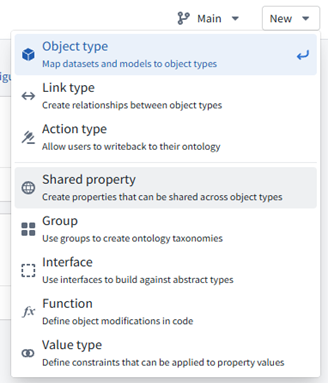
Create them from New → Object Type
Step 2 — Choose Stable Identifiers
Each object type must be anchored to a stable, globally unique identifier. These identifiers ensure that the same real-world entity is consistently recognized across datasets, pipelines, and applications. For example, Customer ID can serve as the primary key for the Customer object, while a human-readable attribute such as Last Name can be used as the display title.
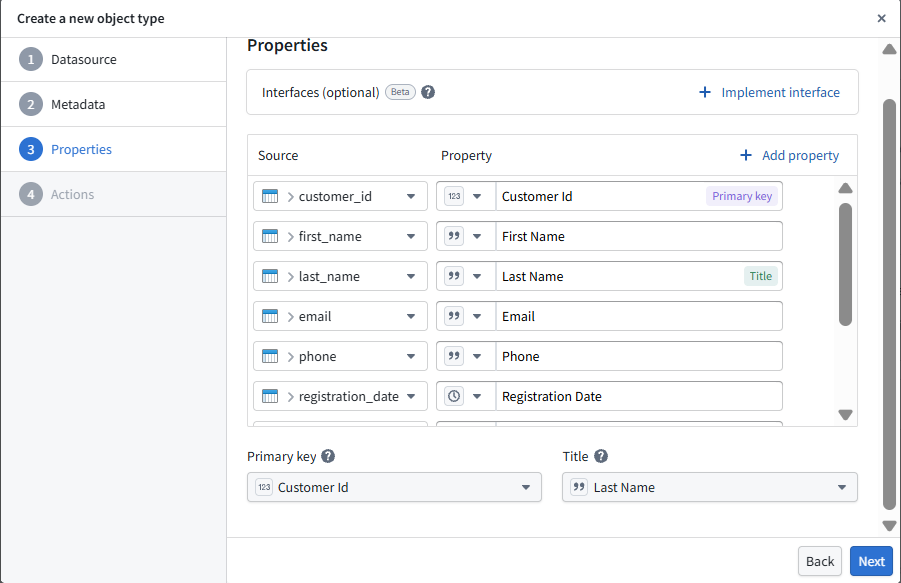
The same principle is applied across Product and Sales objects to maintain consistent identity and traceability across the ontology.
Step 3 — Model Properties (Strong Types & Units)
At this stage, technical columns are transformed into well-defined business attributes with strong data types, validation rules, and units. This ensures that downstream analytics and AI systems interpret values consistently and correctly.
- Customer email (validated string format)
- Product price (decimal with currency constraints)
- Transaction date (timestamp with timezone handling)
Step 4 — Define Link Types (Relationships)
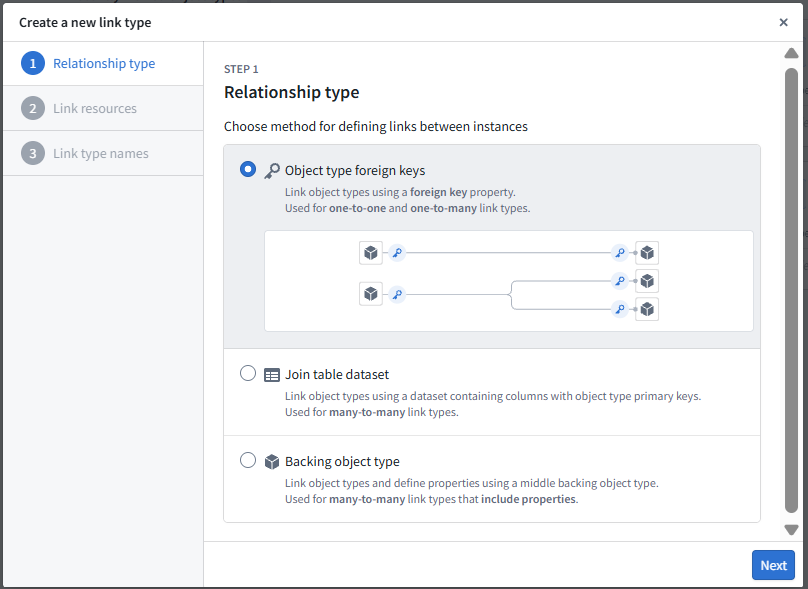
Beyond defining individual objects, Ontology captures how business entities relate to each other. These relationships create a connected semantic layer that enables richer analysis, traceability, and AI-driven reasoning
- Customer -> Sales as one-to-many relationship
- Sales -> Product as many-to-many relationship
- Relationships are derived from foreign keys and join logic to maintain referential integrity across objects.
Step 5 — Attach Policies (Security & Sensitivity)
Security and data sensitivity are embedded directly into the Ontology layer, ensuring that sensitive information is protected consistently across all applications and users. Instead of managing access separately in downstream systems, policies are defined at the data model level, making governance enforceable by design. Sensitive attributes such as email and phone are marked as PII and configured for masking or encryption.
PII Protection with Cipher:
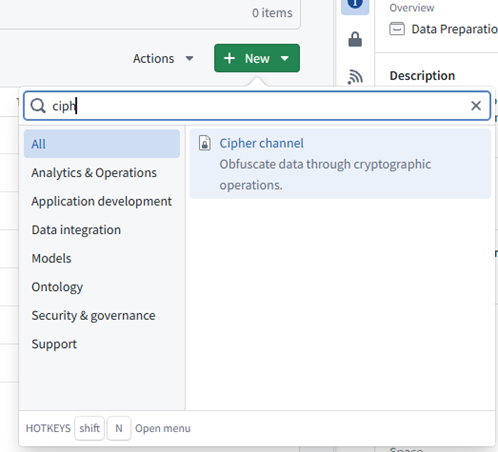
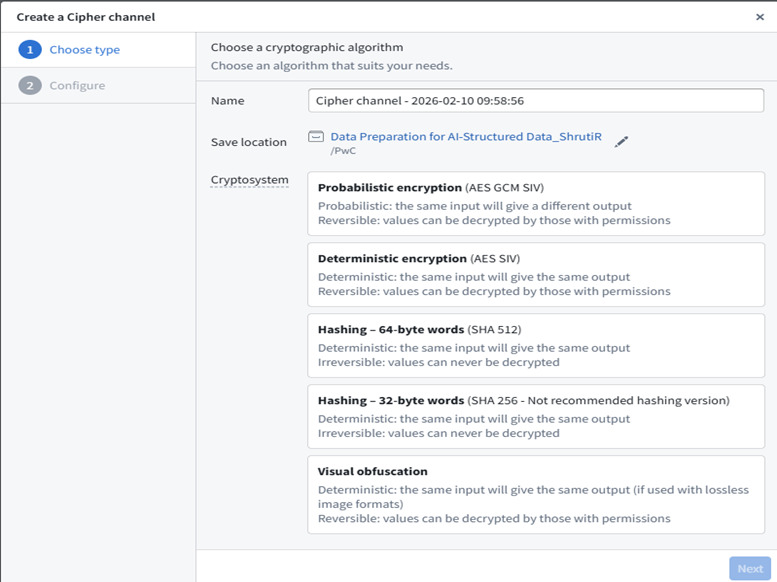
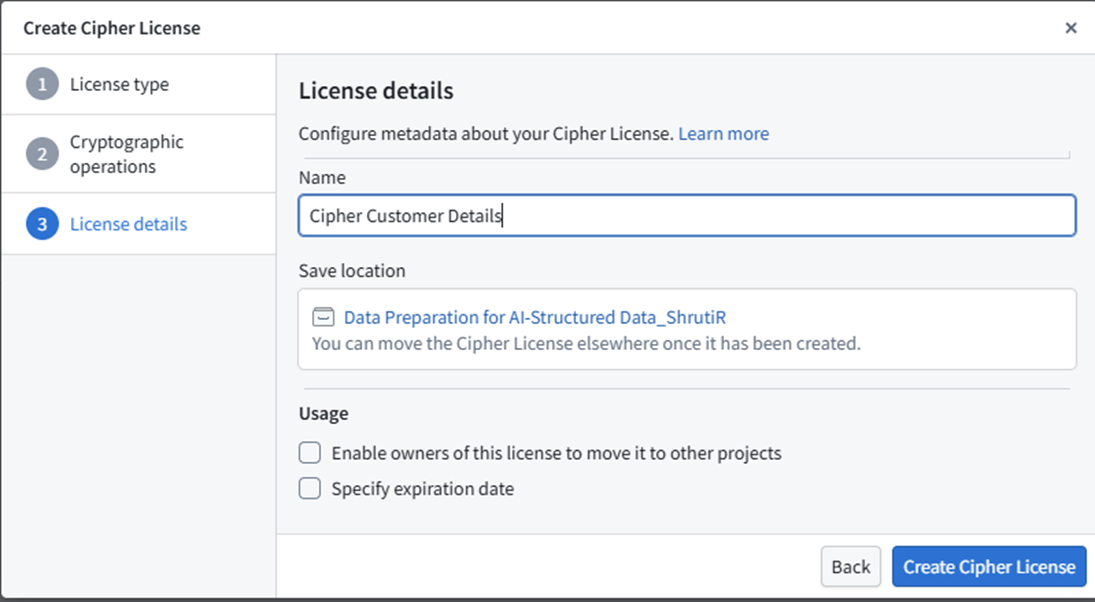
- Create a Cipher Channel and issue a Cipher Data Manager License.
- Add the bellaso-python-lib to your code repository. (Add bellaso-python-lib in the requirements.run block in conda_recipe/meta.yml. You can also do this automatically by adding it in the Libraries panel of your Code Repository environment.)
- Encrypt PII columns in your Python transform using Cipher operations as per the example shown:
from bellaso_python_lib.encryption.encrypter_input import EncrypterInput

@transform.spark.using(
   	encrypter=EncrypterInput("Cipher Customer Details"),
    	output=Output("Customer_Updated",
   	 customer_input=Input("Customer"),
)
- Building encrypted datasets requires Admin or Data Manager permission.
- Reference the encrypted dataset in Ontology Manager, set PII property type to CipherText, and assign the default Cipher Channel.
Row-Level Security in Ontology Manager
- In Ontology Manager, navigate to the object type you want to secure.
- Go to the Security tab.
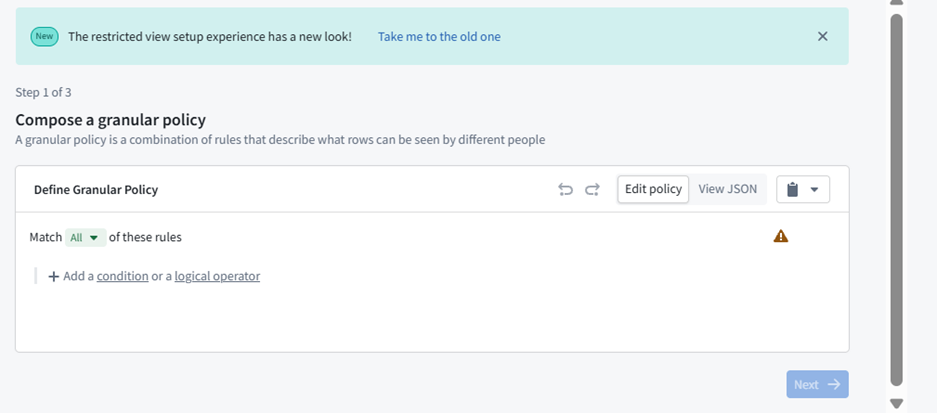
- Create a restricted view of the backing dataset and compose your row-level security policy (e.g., restrict access to rows where region = ‘EMEA’ to specific user groups).
- Assign the policy to the appropriate user groups and save. Only users who meet the policy criteria will be able to view those rows

Step 6 — Create Derived Semantics
Ontology also supports derived attributes that encode business logic directly into the data model. These computed properties allow analytics and AI applications to use consistent, trusted metrics without recalculating logic in every downstream system. Add computed attributes that capture business logic:
- total_amount = quantity × unit_price
- customer_lifetime_value based on historical transactions
- product_velocity from inventory turnover rates
Step 7 — Publish & Version the Ontology
Once modeled, the ontology is published as a governed, versioned layer that serves as a consistent foundation for applications, analytics, and AI systems
- Publish objects governed API-backed entities.
- Maintain semantic versions and change notes.
Step 8 — Operationalize Consumption
The published ontology becomes the foundation for operational consumption across the enterprise. Applications, dashboards, and AI systems can interact with business objects directly instead of raw tables. Natural language interfaces and AIP integrations allow users to ask questions such as “Show customers with declining transactions in the last 90 days,” while governance, security, and audit controls operate seamlessly in the background.
Structured Data: Traditional Tool vs Palantir Foundry
| Capability | Palantir Foundry | Traditional Stack |
|---|---|---|
| Cleaning Reuse | Shared utilities | Rewritten per pipeline |
| Quality Checks | Built-in expectations | Custom scripts |
| Schema Control | Enforced schema governance | Manual handling |
| Business Layer | Business objects (ontology-driven) | Tables only |
| Relationships | Defined once (ontology relationships) | Query-level joins |
This structured data approach from utility-driven cleaning through semantic ontology mapping creates the governed foundation that enterprise AI requires. Clean data evolves into business-intelligent, AI-ready assets with full lineage, security controls, and semantic relationships that enable reliable, scalable AI applications. Next, we’ll explore how this same principled approach extends to unstructured data, where documents and images present entirely different but equally critical challenges for AI readiness.
Unstructured Data Preparation
In real-world scenarios, most data available for AI systems is unstructured. This includes text documents such as emails and articles, PDFs and PowerPoint files containing plain text, text and numeric tables, HTML documents, and system log files. Unlike structured datasets, unstructured data does not follow a predefined schema, making it significantly more challenging to process and prepare for modeling. Palantir Foundry offers two ways to work with the unstructured data 1.) Pipeline Builder 2.) Code Repository
Pipeline Builder is purpose‑built for AI‑driven unstructured data processing, unlike traditional no‑code tools designed for workflow automation. It natively understands PDFs, images, text, chunking, tokenization, and embeddings—making it the ideal engine for preparing insurance policies, contracts, KYC documents, and scanned archives.
Code Repositories are best for preparing unstructured data when you need custom code, advanced processing, or integration with AI/ML model training. They offer flexibility, version control, and access to file system APIs, making them ideal for complex workflows and large datasets.
1.) Unstructured Data Preparation Using Pipeline Builder
Pipeline Builder Superpower: Document → Page → Chunk → Embedding (Full lineage, high explainability, and AI‑ready outputs.)
#### End‑to‑End Flow
Unstructured Data → Parsing → Extraction → Text → Chunking → Tokenization → Embeddings → Ontology
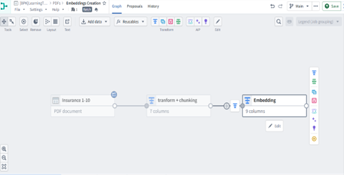
STEP‑BY‑STEP PIPELINE
Step 1 — Upload Unstructured Files to a Media Set
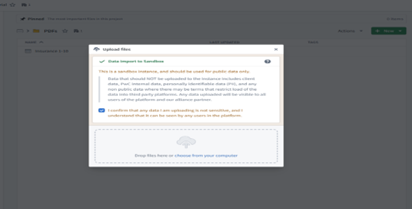
Unstructured documents like PDFs, PPTs, scanned pages, or images are uploaded into a Media Set.
- At this stage, files are still raw binary data.
- No semantic meaning exists yet.
- Pipeline Builder treats them as media assets awaiting parsing.
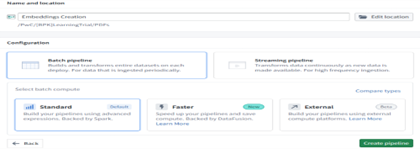
Step 2 — Create a Pipeline (Batch or Streaming)
Choose ingestion style: Batch Pipelines For historical or already‑ingested data. Streaming Pipelines For continuous incoming documents (real‑time ingestion). Both modes apply the same transformations—only timing changes.
Step 3 — Document Nature Identification
Every document is either:
- Digitally Born PDFs
Contain embedded selectable text.
→ Use Raw Text Extraction (more accurate, deterministic) - Scanned PDFs / Images
Contains only pixel-level text.
→ Use OCR (probabilistic, inference-based)
Best Practice:
- Always attempt raw extraction first
- Use OCR only if text is missing
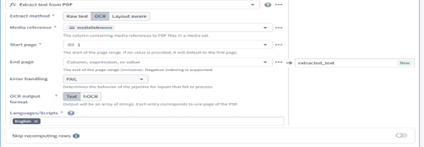
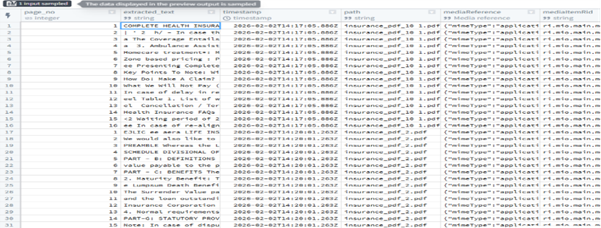
Step 4 — Parse & Extract Text
Start with:
Block: Convert Media Set to Table Rows
Transforms each file into a structured row.
Then apply:
Block: Extract Text from PDF (OCR)
- Used when raw text is not present
- Output = Array of pages ([page_1_text, page_2_text, …])
Normalize arrays via:
- Explode Array with Position
- Extract Struct with Many Fields
Result: Clean page-level text with file ID + page number.
Step 5 — Chunking the Extracted Text
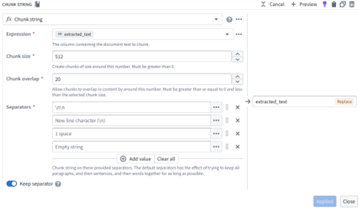
Large text blocks are split into semantically meaningful chunks using Chunk String.
Benefits:
- Higher semantic precision
- Better embedding quality
- Improved search relevance
- Clause-level retrieval (critical for insurance/legal documents)
Chunking Strategy:
- Length-based
- Semantic based
- Header/section-based
- With controlled overlap to preserve context
Step 6 — Generate Embeddings
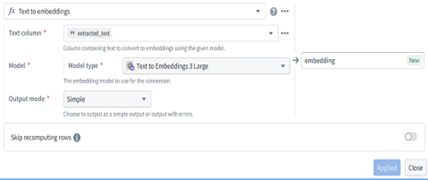
Using the Text-to-Embedding block, chunked text turns into numerical vectors.
Embeddings capture:
- Meaning
- Intent
- Context
- Topic
Output → One vector per chunk → AI‑ready representation.
Step 7 — Store Output as Ontology Objects
Final embeddings are stored as Ontology Object Types.
This enables:
- Semantic search
- Vector retrieval
- Document understanding
- Meaning-based reasoning
- Full lineage (File → Page → Chunk → Embedding)
Step 8 — Similarity Search & Retrieval
User queries are converted into embeddings → compared via cosine similarity.
High cosine score = semantically similar meaning.
Applications:
- AI copilots
- Smart search
- Claims automation
- Policy comparison
- Context-aware Q&A
Why This Pipeline Is Effective
Capability Comparison: Pipeline Builder vs Typical No-Code Tools
| Capability | Pipeline Builder | Typical No-Code Tools |
|---|---|---|
| Unstructured Data Support | ✓ Native | ✗ Limited |
| Document Awareness | ✓ Pages + chunks | ✗ Row-based |
| Embeddings | ✓ Built-in | ✗ Add-on |
| OCR | ✓ Integrated | ✗ External |
| Explainability | ✓ Full lineage | ✗ Minimal |
| AI Readiness | ✓ Designed for AI | ✗ Retro-fitted |
Pipeline Builder transforms messy, unstructured documents into precise, semantically rich embeddings—ready for AI models, copilots, and enterprise search with full transparency and traceability.
2.)Unstructured Data preparation using code repository:
Preparing unstructured data, such as PDFs, for AI model training and inference is a common workflow in Palantir Foundry. This article outlines a robust, production-ready pipeline using the Foundry code repository, covering data ingestion from Microsoft SharePoint, PDF extraction (with a comparison of available libraries), normalization, semantic chunking, embedding strategies, vector database integration, data versioning, and guidance on choosing between snapshot and incremental transforms.

Step 1: Data Ingestion from Microsoft SharePoint
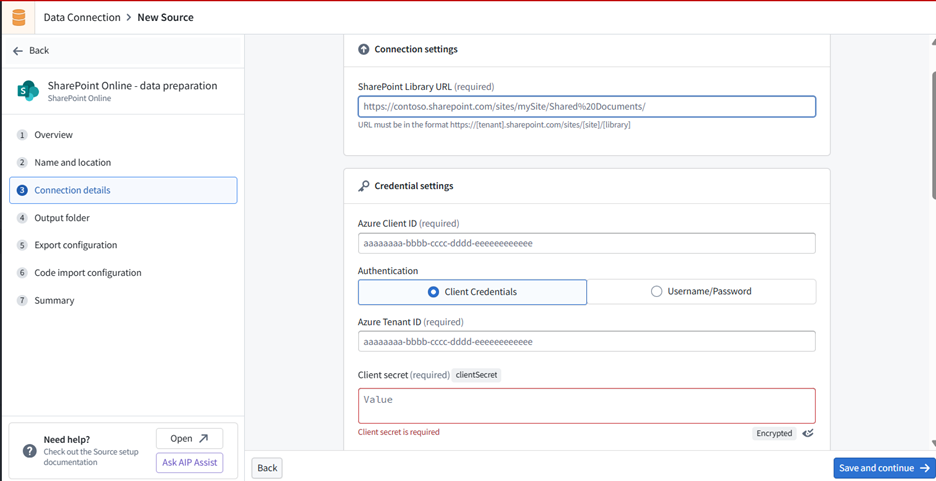
Foundry provides a SharePoint Online connector for ingesting files (including PDFs) directly into datasets. The connector supports file-based ingestion and can be configured for scheduled syncs.
Setup Steps:
- Register an application in Microsoft Entra ID (Azure AD) and grant the necessary Microsoft Graph permissions (e.g., Sites.Read.All for read access).
- In Foundry, open the Data Connection app and create a new source, selecting “SharePoint Online.”
- Enter your Azure Client ID, Tenant ID, and Client Secret.
- Configure the connector to ingest files from your SharePoint site. The connector preserves file formats, so PDFs remain unchanged for downstream processing.
Note: Only SharePoint Online is supported natively. For on-premises SharePoint, use a REST API source type instead.
Step 2: Data Extraction from PDFs
Extracting text from PDFs is essential for downstream AI tasks. Foundry supports several extraction strategies, each with trade-offs in reliability, page handling, and OCR capabilities.
Comparison Matrix: PDF Text Extraction Methods in Palantir Foundry
| Parameter | Foundry Raw Text Extraction | Foundry OCR Extraction (pdfOcrV1) | Foundry Layout-Aware Extraction | Vision LLM-Based Extraction | pdfminer.six (External) | lamma-parse (External) |
|---|---|---|---|---|---|---|
| Accuracy (Digital PDFs) | High | Medium | High | High | High | High |
| Accuracy (Scanned PDFs) | Low | High | High | High | Low | Medium |
| OCR Support | No | Yes | Yes | Yes | No | Partial |
| Table/Figure Extraction | No | No | Yes (to some extent) | Yes (advanced) | No | Yes |
| Customizability | Low | Low | Medium | High (model choice) | High | High |
| Integration with Foundry | Native | Native | Native | Native (code repo) | Manual install | Manual install |
| Support & Maintenance | Palantir Supported | Palantir Supported | Palantir Supported | Palantir Supported | Community / Self-maintained | Community / Self-maintained |
Code : using visionLLM
from transforms.api import Output, transform
from transforms.mediasets import MediaSetInput
from palantir_models.transforms import VisionLLMDocumentsExtractorInput @transform( output=Output("ri.foundry.main.dataset.vision_llm"), input=MediaSetInput("ri.mio.main.media-set.abc"), extractor=VisionLLMDocumentsExtractorInput( "ri.language-model-service.language-model.anthropic-claude-3-7-sonnet" ), )
def compute(ctx, input, output, extractor): # Extract data from the media set using VisionLLM extracted_data = extractor.create_extraction(input, with_ocr=False)
# Write the extracted data to the output dataset
output.write_dataframe( extracted_data, column_typeclasses={ "mediaReference": [{"kind": "reference", "name": "media_reference"}] }, )
Step 3: Text Normalization
Before chunking or embedding, normalizing text ensures consistency and improves downstream AI performance. In Foundry, you can:
- Trim whitespace and normalize case (e.g., all lowercase).
- Remove or standardize special characters.
- Apply Unicode normalization for consistent encoding.
- Nullify empty or placeholder values (e.g., “N/A”, “Unknown”).
- Date format normalization
import pandas as pd
import unicodedata
def normalize_text(text):
if not isinstance(text, str):
return ""
text = text.strip().lower()
text = unicodedata.normalize("NFKC", text)
text = text.replace("n/a", "").replace("unknown", "")
return text extracted_data["normalized_text"]=extracted_data["text"].apply(normalize_text)
Step 4: Semantic Chunking
Semantic chunking splits text into meaningful units (e.g., sentences, paragraphs, or sections) rather than arbitrary fixed-size chunks. This improves the quality of embeddings and search results. Why it matters: Semantic chunking ensures that each chunk is contextually coherent, improving retrieval and LLM performance in tasks like semantic search and summarization.
import pandas as pd import nltk
# Ensure the punkt tokenizer is available (run once per environment) nltk.download('punkt')
def sentence_chunk(text):
""" Splits text into sentences using NLTK's sentence tokenizer. """
if not isinstance(text, str):
return []
return nltk.sent_tokenize(text)
# Example DataFrame with extracted text
df = pd.DataFrame({ "object_id": ["doc1", "doc2"], "extracted_text": [ "This is a long PDF text. It needs to be chunked for embedding. Here is another sentence.", "Another document's extracted text goes here. It has multiple sentences." ]
})
# Apply sentence chunking
df["chunks"] = df["extracted_text"].apply(sentence_chunk)
# Explode chunks into separate rows for downstream processing df_chunks = df.explode("chunks").reset_index(drop=True)
df_chunks["chunk_id"] = df_chunks.groupby("object_id").cumcount() df_chunks["unique_chunk_id"] = df_chunks["object_id"] +"_"+df_chunks["chunk_id"].astype(str)
Step 5: Embeddings
Embeddings convert text chunks into vectors for semantic search and AI workflows. Foundry supports several models: Embedding Models Comparison
| Model Name | Language Support | Max Input Length | Use Case |
|---|---|---|---|
| text-embedding-ada-002 | English, Multilingual | ~8192 tokens | General semantic search |
| MSMARCO (sentence-transformers) | English | 512 tokens | Query–passage retrieval |
| all-MiniLM-L6-v2 | English | 512 tokens | General-purpose embeddings |
| Custom (Imported) Models | Varies | Varies | Domain-specific tasks |
from transforms.api import transform, Input, Output
from palantir_models.transforms import ModelInput @transform( input_chunks=Input("ri.foundry.main.dataset.chunks"), output=Output("ri.foundry.main.dataset.embeddings"), embedding_model=ModelInput("ri.language-model-service.language-model.text-embedding-ada-002"),
)
def compute(ctx, input_chunks, output, embedding_model):
df = input_chunks.dataframe()
df = df.rename(columns={"chunks": "text"})
result = embedding_model.transform(df).output_data
output.write_dataframe(result)
Step 6: Vector Database Integration
A vector database is a specialized data store designed to efficiently index, store, and search high-dimensional vectors—such as the embeddings generated from text, images, or other unstructured data. Vector databases are optimized for operations like nearest neighbor search, which is essential for
The embeddings you create from text chunks (using models like text-embedding-ada-002 or all-MiniLM-L6-v2) are high-dimensional vectors that capture the semantic meaning of the original data. Storing these embeddings in a vector database allows you to:
- Perform semantic search: Retrieve documents or text chunks that are semantically similar to a query, even if they don’t share exact keywords.
- Enable advanced AI applications: Power use cases like question answering, document clustering, and recommendations by comparing vector similarity.
- Scale to large datasets: Efficiently index and search millions of vectors using approximate nearest neighbor algorithms.
Vector Database Integration in Foundry:
- Store embedding vectors as properties on objects within the Ontology, enabling similarity search and advanced retrieval workflows.
- Index and query these embeddings using nearest neighbor search, supporting applications like document Q&A, semantic search, and recommendation engines.
- Link vector data with metadata, access controls, and lineage tracking, ensuring robust governance and traceability.
Step 7: Data Versioning
Data versioning is essential for reproducibility, auditing, and collaboration:
- Foundry tracks versions of datasets, pipelines, and models. Every change creates a new version, allowing you to roll back, compare, or audit changes.
- Semantic versioning is used for code and function releases, ensuring stability and backward compatibility.
- Best Practice: Lock production pipelines, require code reviews, and use versioned datasets for traceability and compliance.
Step 8: Decide transform type (Incremental vs. Snapshot Transforms)
When building data pipelines in Palantir Foundry, choosing between incremental and snapshot transforms is crucial for performance, scalability, and data freshness.
Snapshot Transforms: Process the entire input dataset every time the pipeline runs.
Incremental Transforms: Only process new or changed data since the last successful pipeline runs.
Best Practices:
- For SharePoint ingestion and ongoing document processing, use incremental transforms to process only new or updated files, ensuring timely extraction and embedding without reprocessing the entire corpus.
- For one-time migrations or when the transformation logic changes significantly, use snapshot transforms to ensure all data is processed with the latest logic.
- Foundry allows you to configure transform type in both Pipeline Builder and code repositories, supporting flexible and robust pipeline design.
How Palantir Foundry Is Different
- Unified Data & AI Platform A single environment for ingestion, transformation, modeling, and operationalization, removing the need for multiple disjointed tools and reducing integration overhead.
- Ontology‑Driven Data Modeling A semantic layer that links data, business logic, and access controls. This goes beyond catalogs/registries by enabling context-rich analytics, AI, and secure, governed data relationships.
- No‑Code + Pro‑Code Flexibility Visual tools (Pipeline Builder, Quiver, Contour) and full-code experiences (Workspaces, Code Repos) in one platform. Users can fluidly move from no‑code to code without tool switching.
- Enterprise‑Grade Security & Governance Fine‑grained access control, full lineage, and automatic versioning for every dataset, pipeline, and model—ensuring auditability and compliance by design.
- Scalability & Performance Built for massive data and complex pipelines with distributed compute, support for batch + streaming, and infrastructure that scales automatically.
- Integrated Model Management Native ML tooling for training, deployment, monitoring, plus support for external and containerized models—simplifying the entire ML lifecycle.
- Interoperability Connects seamlessly with tools like Jupyter, PowerBI, and Tableau, and supports open standards to fit cleanly into existing enterprise ecosystems.
- Production‑Ready Pipelines Incremental/snapshot transforms, strong scheduling, and resilient error handling make it easy to build and maintain robust, production-grade data and AI pipelines.
- Collaboration & Auditability Built‑in version control, comments, and activity history ensure smooth collaboration and full traceability across teams.
Palantir Foundry stands out for its unified platform, semantic data modeling , robust governance, flexible user experience, and production-grade scalability. These features enable organizations to move from raw data to operational AI solutions faster and with greater confidence than most other platforms.